
A comfortable desk and office setup isn’t a luxury, it’s a productivity tool. Whether you’re balancing hours of focused work, loads of time on calls, or a growing to-do list and looking for a way to be more comfortable so you can be more productive more easily, the right gear can transform your WFH experience. Just because it’s work doesn’t mean it has to be miserable – anymore. Here’s your practical guide to essential ergonomic and comfort buys for 2026.
These items were chosen for ergonomic design, their qualities, what they had to offer, and real-world comfort.
A thoughtfully equipped workspace pays off in comfort, focus, and long-term health. Start with a solid chair and desk, then tailor the rest of the setup to your individual needs and budget. Small, incremental improvements can yield big gains over time. In this article we will go over what ergonomic design is, what it has to offer as well as other often overlooked aspects to home office design for work from home to holistically aid in your comfort (and by extension, your productivity).
What is Ergonomic Design?
Ergonomic design aims to fit tasks, equipment, and environment to the user. It blends principles from physiology, psychology, engineering, and design to create comfortable, safe, and productive work settings. It focuses on posture, reach, force, repetition, and duration to minimize discomfort and maximize efficiency.
Core Principles of Ergonomics
- Fit the task to the person rather than forcing the person to fit poorly designed tools.
- Neutral postures: Maintain natural spine alignment, relaxed shoulders, and wrists near straight.
- Variety and movement: Alternate tasks and encourage micro-movements to reduce repetitive strain.
- Support and stability: Use supports (chair back, forearm rests) to minimize muscle effort.
- Environment: Consider lighting, temperature, noise, and visual comfort.
- Accessibility: Position frequently used items within easy reach.
A Brief History of Ergonomic Design
Origins in the 19th century
The term “ergonomics” is often traced to Wojciech Jastrzębowski, who described a science of working conditions in the 19th century.
Mid 20th century
Industrial engineering and human factors gained prominence, particularly in manufacturing, aviation, and military applications.
Postwar expansion
Research expanded to include office work, tools, and equipment; emphasis on reducing worker fatigue and errors grew.
Late 20th century to today
Standards and guidelines (eg, ISO 9241 on human-centered design) formalized ergonomic principles for diverse contexts, including home offices.
Why ergonomic and comfort buys matter for work from home
Why ergonomics matter
- Reduces risk of strain and injury
- Improves posture and circulation
- Boosts focus and productivity
- Enhances long-term comfort during extended workdays
- Proper posture reduces fatigue, pain, and distraction.
- Comfortable setups lead to longer, more focused work sessions.
- Remote work persists, keeping demand and research happening for affordable, effective gear
The cultural shift that has made work from home more commonplace – and desired – has made home offices the primary workspaces for millions. While convenience is a major benefit, the long-term health and productivity implications of how we set up these spaces are often overlooked. The science behind ergonomics shows that thoughtful purchases focused on comfort and proper alignment can reduce pain, improve focus, and support sustainable work habits. This post explains why ergonomic and comfort investments matter and offers practical, evidence-based guidance for choosing equipment.
How to Apply Ergonomics to Work From Home Setups
1) Workspace Layout and Furniture (Essentials)
- Chair: Adjustable height, lumbar support, and seat depth that allows 2-3 fingers clearance behind the knees.
- Desk: A height that keeps forearms parallel to the floor when typing; enough legroom for comfortable movement.
- Monitor placement: Top of the screen at or just below eye level, about an arm’s length (about 20-30 inches) away.
- Keyboard and mouse: Keep wrists straight (aka a neutral position); use a split keyboard or ergonomic mouse if preferred.
- Footwear and feet: Feet flat on the floor or on a footrest; avoid dangling feet. Often recommended knee angle is 90-120 degrees.
2) Posture and Movement
Sit with:
- Head aligned over shoulders
- Shoulders relaxed
- Elbows close to the body at about a 90-degree angle
- Take short breaks every 30–60 minutes to stand, stretch, or walk.
- Alternate between seated and standing tasks if possible.
Key considerations
Adjustable chair settings like depth (for knee placement/angle ), and adjustable lumbar support and memory padded seats
Straight wrists and neutral position (not bent) when it comes to keyboard and mouse.
Ergonomic Work from Home Setup
Ergonomic Chairs and Seating

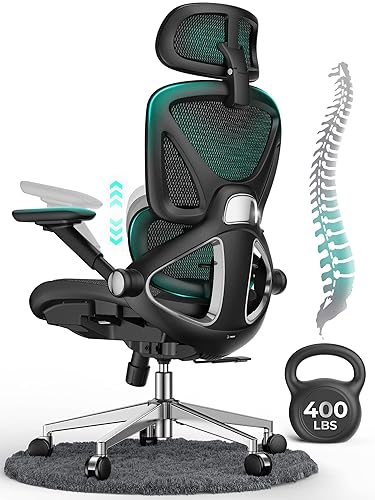

What you want: A chair with adjustable features including seat height, depth, backrest height, and built-in adjustable lumbar support. These support natural spinal curves, reduces lower back strain, and promotes comfortable long hours.
What to look for: Adjustable seat height, depth, lumbar support, back angle, and armrests. A chair with a 90–120 degree knee angle is often recommended. And seat depth that allows 2-3 fingers clearance behind the knees.
Why it helps: Promotes a neutral pelvic tilt, maintains natural lower back curvature, and reduces muscle fatigue in the back and hips. Ergonomics handbooks and biomechanics literature consistently link chair adjustability and lumbar support to better spinal alignment and lower muscle load during prolonged seating.
Sources:
– Chaffin, D. B., Andersson, G., & Martin, B. (2006). *Occupational Biomechanics* (3rd ed.). John Wiley & Sons.
– Kroemer Elbert, K., Kroemer, H. B., Kroemer Hoffman, A. (2018). Ergonomics: How to Design for Ease and Efficacy (3rd ed.). Academic Press.
– HSE. (n.d.). Ergonomics and workstation setup. Retrieved from https://www.hse.gov.uk
– OSHA. (n.d.). Computer workstations eTool: Ergonomic guidelines. Retrieved from https://www.osha.gov/SLTC/etools/computerworkstations
Top 3 – Most Reviews & Highest Rated on Amazon
👉 TRALT Ergonomic Desk Chair, High Back, Adjustable, Home Mesh Office Desk, 330 LBS limit
👉 GABRYLLY Ergonomic Chair with Footrest, High Back, 3D Headrest, Flip-Up Arms, 135° Tilt and Wide Cushion, Heavy Duty Mesh Office Chair
👉 Ergonomic Mesh Office Chair – 3D Adjustable Lumbar Support & 3D Armrests, V-Shaped Back, Adjustable Desk Chair for Office & Home, White
Adjustable Desks and Desk Mounts
Sit-stand desk (adjustable height desk)


What to look for: Smooth height adjustability, programmable presets, stability, and enough surface area for your equipment.
Why it helps: Encourages movement and reduces prolonged static postures.
Research note: Alternating between sitting and standing can lower fatigue and may improve posture; consistency and proper height while standing are key to avoiding new strains.
Monitor(s) at Eye Level with Proper Distance


Why it helps: Reduces neck strain and eye fatigue.
What to look for: Top of screen at or slightly below eye level, about 20–30 inches away (roughly arm’s length), and secondary monitor alignment if dual screens.
Research note: Neutral head posture and adequate viewing distance are linked to fewer neck and shoulder symptoms. (Nakphet, N., & Chaikumarn, M. (2024). A comparison of neck and shoulder postures in symptomatic and asymptomatic female office workers in the actual work environment. Heliyon, 10(7), e28628.)
Keyboard and Mouse setups for Neutral Wrists
Ergonomic Mouse
Ergonomic vertical mice engage different parts of the arm – the forearm and shoulder (Chen, H.-M., & Leung, C.-T. (2007). The effect on forearm and shoulder muscle activity in using different slanted computer mice. Clinical Biomechanics, 22(5), 518–523.).
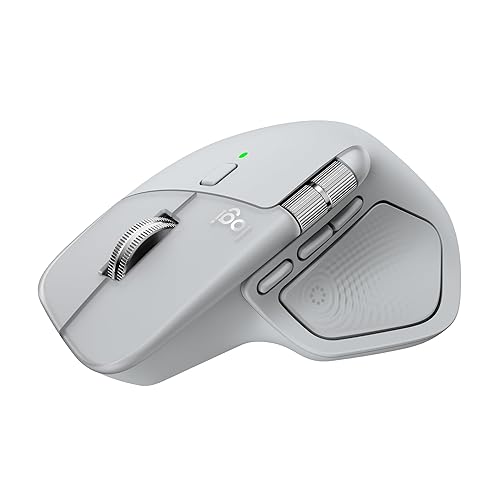
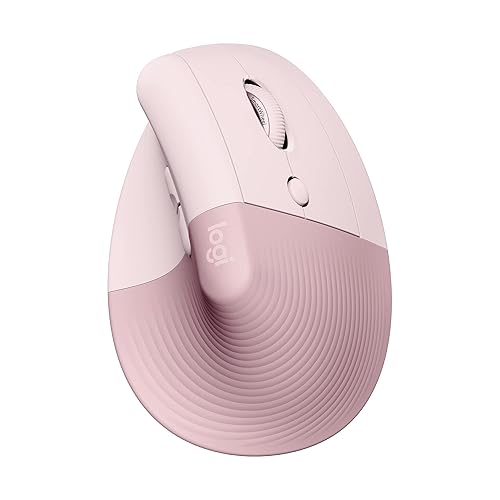
“At a mid-range price point, the Logitech Lift is the best vertical mouse we recommend to most people. Its orientation places your hand in a more natural handshake position compared to the conventional design of our best pick, the Logitech MX Master 4. This design aims to reduce wrist strain by allowing your hand and wrist to rest more naturally on the desk while limiting forearm pronation, which can contribute to nerve compression in the forearm and wrist. This mouse is a bit smaller than other options on this list, making it a great choice if you have small- or medium-sized hands, and there’s also a left-handed version available, which is a welcome option given how many ergonomic mice are still right-handed only.” – rtings.com (https://www.rtings.com/mouse/reviews/best/ergonomic)

↑
Logitech MX Master 4
Logitech Lift
→

While non-neutral wrist positions and external pressure that result in increased carpal tunnel pressure while using a computer have been associated with increased risk of carpal tunnel syndrome, one study (n=21 n=study sample size | cited below) found that for patients who already developed carpal tunnel syndrome, while the use of a vertical mouse reduced ulnar deviation, “and the gel mouse pad and gliding palm support decreased wrist extension, none of the ergonomic devices [studied] reduced carpal tunnel pressure.” (Schmid, A. B., Kubler, P. A., Johnston, V., & Coppieters, M. W. J. (2015). A vertical mouse and ergonomic mouse pads alter wrist position but do not reduce carpal tunnel pressure in patients with carpal tunnel syndrome. Applied Ergonomics, 47, 151-156.)
What it means? Neutral wrist positions can help avoid carpal tunnel syndrome. It was the findings of this relatively small sample size study, that in those who had already been diagnosed with carpal tunnel syndrome, while some measures like ulnar deviation were significantly reduced by the use of vertical mouse, and wrist extension was reduced by gel mousepad and sliding palm support, neither ergonomic device reduced carpal tunnel pressure. So the authors of the study suggest, in this case (one already having carpal tunnel syndrome) someone’s ergonomic device choice by the person’s preference.
Some people like the handshake style of a vertical mouse and others find a trackball and the reduced wrist movement more comfortable. But if your favorite mouse is regular style and you’re someone who has carpal tunnel syndrome and is looking for something to help reduce carpal tunnel pressure, don’t feel too bad about using what you have and let preference guide your decisions. Regular, Vertical or Trackball.
Ergonomic Keyboards


Integrated Palm Support. Orthogonal layout has keys arranged to mirror the natural motion of fingers. It also takes into consideration stronger parts of the hand (thumbs) and pair it with most used keys – Enter, Spacebar, etc.
Ergonomic keyboard and mouse setups (tilted keyboard stands, wrist and elbow rests)


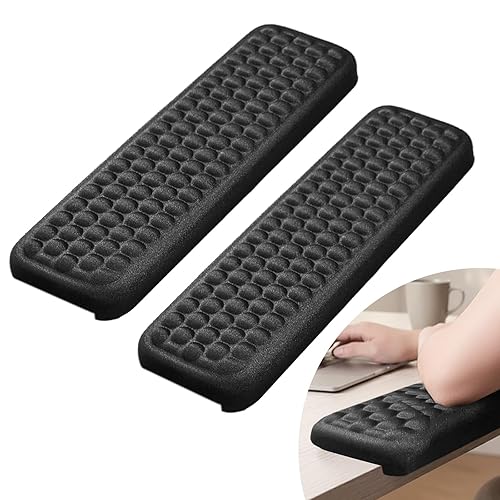
Why it helps: Keeps wrists in a neutral position, reduces carpal tunnel risk, and minimizes forearm strain.
What to look for: Contoured keyboards, adjustable or trackball/multi-button mice, and a keyboard tray that allows a slight negative tilt without bending wrists.
Research note: Ergonomic input devices that promote straight wrists and relaxed shoulders can lower risk of repetitive strain injuries.
It’s all about the Ambiance
Designing your Ergonomic and Comfort centered work from home haven is about more than just proper alignment and rest. Psychologically a more comfortable environment is going to be more beneficial to your mind, and therefore your body. Psychophysiology is the study of how the mind effects the body and it does to an astounding degree. By that logic keeping your mood and outlook calm and cheerful will not also not only help your health and wellbeing, but also productivity and satisfaction.
Here are some of those essentials:
Heater, fireplace
Rabbit Fur Blanket
Candle Warmer


The little details
Keep your often used essentials close by to minimize bending and twisting. Ergonomic Monitor Placement. Document holder to keep papers at eye-level. Keyboard tilt riser. Keyboard wrist pad. Wrist rest Mousepad. Elbow desk pads. Desk edge pads. And those little comfort touches like soft blankets and things that add ambiance like candle warmers and fireplace heaters to make it all holistically cozy.
| Category | What to look for |
|---|---|
| Ergonomic chair | Lumbar support, adjustability, breathable fabric |
| Sit-stand desk | Range of height, stability, products with good reviews, ease of use |
| Keyboard and mouse | Neutral wrist design, soft touch, adjustable tilt, palm/wrist support |
| Monitor setup | Height adjustability, glare reduction, dual monitor friendly |
| Footrests and mats | Height support, anti-fatigue properties |
Here are some of the niche items that you only need if you need them
Acoustic comfort and headset with good fit
Why it helps: Reduces cognitive load and neck tension from tension and improper neck posture during calls.
What to look for: Lightweight headset with a secure fit, good microphone pickup, and adjustable headband.
Research note: Clear communication and reduced need for awkward head/neck movements support overall comfort. (Mohamed Abdel Moneim, O.M., Kamel, R.M. & Abdelhay, M.I. Efficacy of neck-mounted lazy holder for smartphones on cervical pain and function in patients with non-specific neck pain. Bull Fac Phys Ther 30, 35 (2025).)
Footrest (if feet don’t comfortably reach the floor)
Why it helps: Encourages proper leg circulation and a comfortable hip angle.
What to look for: Adjustable height and tilt, sturdy surface.
Research note: Keeping feet flat or supported helps maintain a stable pelvic position and reduces lower back strain.
Anti-fatigue mat for standing work
Why it helps: Reduces leg and lower back fatigue during standing tasks.
What to look for: Cushioned but supportive mat with good traction, appropriate thickness for your footwear.
Research note: Soft but stable surfaces can lessen discomfort during prolonged standing.
How to Apply Ergonomics to Work From Home Setups Continued…
6) Breaks and Movement
- Follow the 20-8-2 rule: every 20 minutes, take an 8-second microbreak; every 2 hours, take a longer 5-minute break.
- Include simple stretches for the neck, shoulders, wrists, and back.
7) Organization and Tools
- Use task-specific zones: a primary work area, a secondary reference area, and a relaxation area.
- Keep essential items within arm’s reach to minimize reaching and twisting.
8) Personal Comfort and Wellness Peripherals
- Cushioned chair pads and lumbar cushions
- Wrist supports for keyboards and mice
- Small fans or cooling pads for overheating during long workdays
- Hydration setup: water bottle within easy reach
Quick-Start Checklist
- [ ] Adjustable Ergonomic chair with adjustable lumbar support and adjustable armrests, height, seat depth, etc.
- [ ] Adjustable sit-stand desk
- [ ] Monitor at eye level, ~50–70 cm (~20-30 in.) away
- [ ] Desk at proper height for forearms parallel to the floor
- [ ] Keyboard and mouse positioned to keep wrists straight
- [ ] Adequate lighting with minimal glare
- [ ] Footrest or feet flat on the floor
- [ ] Space for short movement breaks
- [ ] Regular scheduled breaks
- [ ] Document stand or monitor arm
- [ ] Comfortable headset or microphone setup
Practical Comparison: Ergonomic vs Traditional Office Setup
| Aspect | Ergonomic Design | Traditional Design |
|---|---|---|
| Posture focus | Neutral, comfortable alignment | May encourage slouching or awkward positions |
| Equipment approach | Fit to user needs | Fit to available space or expected strict “office” aesthetics |
| Movement | Encouraged variety and breaks | Often static for long periods |
| Health emphasis | Reduces risk of MSDs (musculoskeletal disorders) | Short-term comfort prioritized |
| Adaptability | Adjustable chairs, desks, peripherals | Fixed |
How the research supports these choices
- Neutral postures reduce strain: Maintaining joints in a neutral position (not overly flexed or extended) lowers muscle fatigue and joint stress.
- Prolonged sitting is a risk, but movement helps: Regular position changes and movement patterns (sit-stand, micro-breaks) are associated with reduced discomfort and better musculoskeletal health.
- Proper screen and input alignment matter: Eye-level monitors and wrists aligned with keyboards help prevent neck, shoulder, and wrist strain.
- Task-specific adjustments matter: Different tasks benefit from targeted adjustments (e.g., document proximity, exact keyboard layout, monitor height).
Final Takeaway
A well-rounded ergonomic home office blends a supportive chair, an adjustable desk, properly positioned monitors, and friendly input devices. Ground your choices in posture, movement, and alignment principles, and tailor setups to your body and tasks. With thoughtful selection, you can reduce discomfort and sustain productivity over long work-from-home days.
Ergonomic design is about aligning your work setup with your body’s needs. A well-placed monitor (about 20–30 inches away, top of screen at or slightly below eye level), some ergonomic desk accessories like elbow pads and keyboard and mouse wrist supports…
A well-planned home office reduces fatigue, lowers the risk of injury, and boosts productivity. Start with a few adjustable essentials, apply proper posture, and build small, sustainable habits over time.
Further Reading (What the Research says)
- Chaffin, D. B., Andersson, G., & Martin, B. (2006). *Occupational Biomechanics* (3rd ed.). John Wiley & Sons.
Relevance: Comprehensive treatment of seated posture, joint loads, and how chair design affects spinal loading and muscle effort. - Kroemer Elbert, K., Kroemer, H. B., Kroemer Hoffman, A. (2018). Ergonomics: How to Design for Ease and Efficacy (3rd ed.). Academic Press. Link: Available on Amazon.com
Relevance: Foundational concepts on neutral postures, joint angles, and how seat features influence spinal alignment and muscle activity. - HSE. (n.d.). Ergonomics and workstation setup. Retrieved from https://www.hse.gov.uk/pubns/books/hsg57.htm
– Relevance: Practical guidelines on seat height, seat depth, lumbar support, backrest angle, and neck alignment to reduce spinal stress and fatigue. - Occupational Safety and Health Administration (OSHA). (n.d.). Computer workstations eTool: Ergonomic guidelines. Retrieved from https://www.osha.gov/SLTC/etools/computerworkstations
– Relevance: US-based guidelines translating biomechanics into recommended workstation configurations. - American National Standards Institute (ANSI).
“Ergonomic Guidelines for Computer Workstations.” (ANSI/HFES 100-2007)- Provides guidelines emphasizing the importance of neutral wrist positions and relaxed shoulders to prevent strain.
Link:https://www.knoll.com/knollnewsdetail/overview-of-the-ANSIHFES-100-2007-ergonomic-standard
- Provides guidelines emphasizing the importance of neutral wrist positions and relaxed shoulders to prevent strain.
- Helander, M. (2006). A Guide to Ergonomic Design (2nd ed.). Taylor & Francis. Link: https://journals.sagepub.com/doi/10.1177/106480460701500308
– Relevance: User-centered seating design and how alignment reduces physical strain during prolonged use. - Hoe, V. C., Urquhart, D. M., Kelsall, H. L., Zamri, E. N., & Sim, M. R. (2018). Ergonomic interventions for preventing work-related musculoskeletal disorders of the upper limb and neck among office workers. The Cochrane database of systematic reviews, 10(10), CD008570. https://doi.org/10.1002/14651858.CD008570.pub3)
- McGill, S. M. (2007). Low Back Disorders: Evidence-Based Prevention (2nd ed.). Human Kinetics. Link: Available on Amazon.com
– Relevance: Synthesizes evidence on spinal load, posture, and how posture relates to muscle fatigue and low back pain risk. - Nakphet, N., & Chaikumarn, M. (2024). A comparison of neck and shoulder postures in symptomatic and asymptomatic female office workers in the actual work environment. Heliyon, 10(7), e28628. https://doi.org/10.1016/j.heliyon.2024.e28628
- Mohamed Abdel Moneim, O.M., Kamel, R.M. & Abdelhay, M.I. (2025) Efficacy of neck-mounted lazy holder for smartphones on cervical pain and function in patients with non-specific neck pain. Bull Fac Phys Ther 30, 35 (2025). https://doi.org/10.1186/s43161-025-00293-z
- Chen, H.-M., & Leung, C.-T. (2007). The effect on forearm and shoulder muscle activity in using different slanted computer mice. Clinical Biomechanics, 22(5), 518–523. https://doi.org/10.1016/j.clinbiomech.2007.01.006
- Schmid, A. B., Kubler, P. A., Johnston, V., & Coppieters, M. W. J. (2015). A vertical mouse and ergonomic mouse pads alter wrist position but do not reduce carpal tunnel pressure in patients with carpal tunnel syndrome. Applied Ergonomics, 47, 151-156. https://doi.org/10.1016/j.apergo.2014.08.020
- Mahpirat, Yadikar, N., Zhou, W., Mamat, H., & Ubul, K. (2018). Design of children’s mouse based on ergonomics. Australian Journal of Mechanical Engineering, 16, 128–132. https://doi.org/10.1080/1448837X.2018.1545484
- Cornell University Ergonomics Web. 3250/6510 CLASS NOTES Link: https://ergo.human.cornell.edu/DEA3250Flipbook/DEA3250notes/sitting.html
What are your work from home go-tos? What makes your workspace better? Let us know in the comments
Leave a Reply